iiko conceptions
How an invoice gets a conception: invoice, warehouse, restaurant — and what goes to iiko.
Where it is: Settings: invoice rules →
about 2 minUpdated October 16, 2026
If your iiko restaurant uses conceptions, ReconDoc fills in the conception on the incoming invoice and sends it along with the document. The conception directory is pulled with the same Sync button as warehouses and suppliers.
Where the conception comes from#
- Invoice. On the card next to the warehouse there is a Conception dropdown. A conception picked here takes priority over everything else. No conception means explicit reset: the document will go to iiko without a conception.
- Warehouse. In References → Warehouses each warehouse has its own setting. When the invoice is set to Automatically, the conception is taken from the receiving warehouse (and from line warehouses if they have their own).
- Restaurant. Settings → Invoice rules → Sending & currency → Default conception — when neither invoice nor warehouse set anything.
If lines are on warehouses with different conceptions, the card shows a warning and blocks sending: pick a conception for the document or split the invoice.
Conception in the bot#
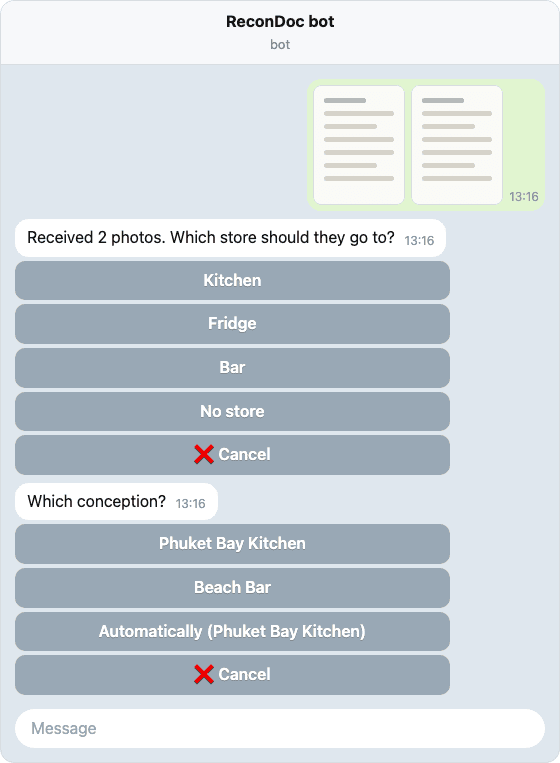
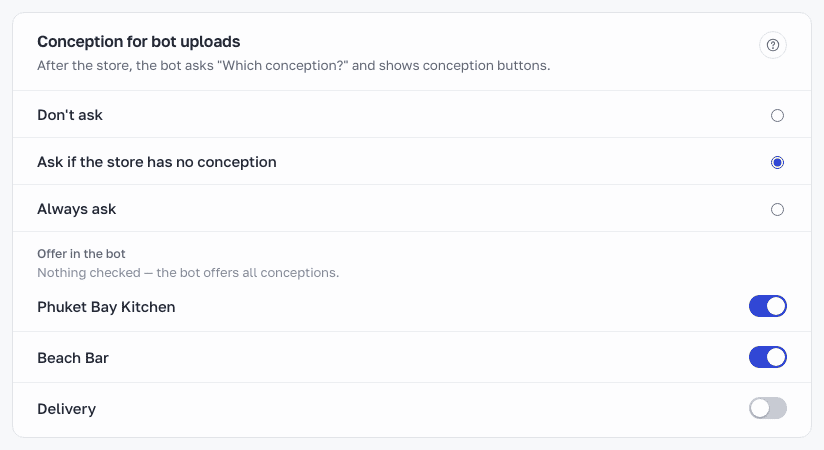
The bot can ask for the conception right after the store: "Which conception?". It is turned on in the Bots & messengers screen settings - Conception for bot uploads. A conception chosen in the bot is saved to the invoice the same way as a choice in the card header, and you can change it on the website. If the conception was deleted in iiko, the bot warns about it, and the website will not let you send the invoice until another one is chosen.
Rewriting#
If you do not change the conception in ReconDoc after sending, the conception that is in the document now stays in iiko — the accountant's edit in BackOffice is not lost. If you change the conception on the card, the new value is sent. On the sent invoice card you can see "In iiko: …".
Deleted conception#
A conception deleted in iiko stays in the dropdowns marked, so you can see it, but you cannot send with it — pick another one or Automatically.
What's next
Didn't find the answer, or the guide didn't help?
Ask support