A Telegram group: invoices from your working chat
How to link a working group to a restaurant and why the bot needs admin rights.
Where it is: Settings: bots and messengers →
about 3 minUpdated October 4, 2026
If your buyers already discuss deliveries in a shared chat, nobody has to forward invoices to the bot personally. Link the group to a restaurant, and photos from the chat reach the service on their own.
How to link it#
- In the service, open Settings → Bots & messengers, the «Groups» card.
- The card shows one of two equally valid ways:
- there is an Add the bot to a group button — press it and open the link, Telegram will offer to pick a group;
- there is no button, only a code — add the bot to the group manually (search for it by name in Telegram) and send the command
/link <code>in the group's chat.
- Open the group settings and make the bot an administrator.
- That is it: the bot posts in the chat which restaurant the group is linked to.
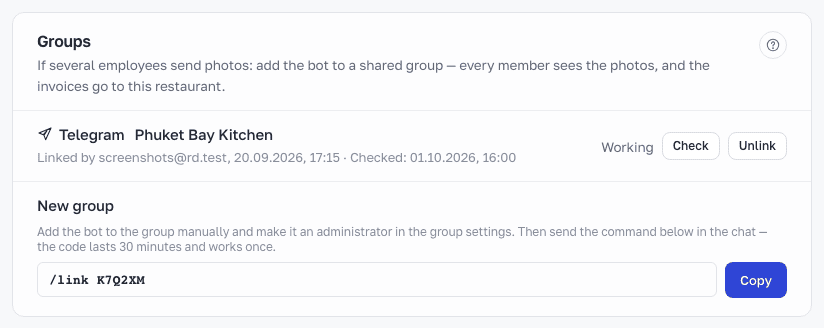
The link or code is issued by the restaurant owner, and the same person has to use it. Either way it lasts 30 minutes and works once.
Why the bot needs admin rights#
This is not about access to your conversations — quite the opposite. Telegram has a privacy mode: it is always on for our bot and hides every group message from it except those addressed to the bot directly. Privacy can only be switched off wholesale, for all groups at once — the bot would then see every conversation in every group. We do not do that.
Administrator rights work differently: an administrator does see the group's messages, but only in THIS group. So admin rights are not wider access, they are narrower: the permission is granted one group at a time and revoked in the same place.
Plain administrator status is enough — you do not need to tick individual powers such as deleting messages, banning members, or editing the group profile.
Without admin rights the bot stays in the group and looks like it is working, but it never sees the photos — Telegram's privacy mode hides them from it. There is no error: you would only notice once an invoice goes missing.
Tip
You can check everything in the same settings card: a linked group shows whether the bot is an administrator, and there is a «Check» button.
What reaches the service#
Only photos and invoice files. The service does not read or store ordinary chat messages.
An invoice from a group goes to the restaurant the group is linked to: the bot does not ask «which restaurant» in a group. The invoice card shows who sent the photo.
Important
Invoices from a group count against your plan the same way as browser uploads.
How to unlink#
In the «Groups» card press Unlink — the bot says goodbye in the chat and stops accepting photos. Invoices already received stay in the service as they are: unlinking only stops the group from sending new photos. The bot stays in the group: remove it manually if you no longer need it there. Kicking the bot out of the group unlinks it automatically.
What about MAX?#
A MAX group is linked with the same kind of code, from the Groups card after picking MAX; the bot needs admin rights there too. See The MAX bot.
What's next
Didn't find the answer, or the guide didn't help?
Ask support