Telegram bots: photos straight from the kitchen
Two bots, the difference between them, and how to link notifications to yourself.
Where it is: Settings: bots and messengers →
about 3 minUpdated October 16, 2026
The shortest path an invoice can take into the service is straight from the storekeeper's hands, in Telegram. Someone photographs the document on delivery, and the invoice shows up on its own.
Two bots#
The service's shared bot. Works on any plan. It asks which restaurant to put the invoice in — needed when you run more than one place.
Your restaurant's own bot. You set it up yourself in BotFather and paste the token into settings. It asks which store, not which restaurant (when the question is turned on — it is on by default) — handier when there's one restaurant but several stores. Available on all plans.
Tip
A dedicated bot is also handy because it carries your own name and avatar — staff know at a glance where they're sending photos.
A group chat. The shared bot can accept photos straight from a working group — then nobody has to forward them personally. How to link a group and why the bot needs admin rights is covered in «A Telegram group».
How to send#
Just send the photos one after another — the bot waits a few seconds and asks its question once for the whole batch. Each photo becomes a separate invoice: merge the pages of one document afterwards in Invoices with the Merge button.
Important
Invoices from the bot use up the plan limit the same way invoices uploaded through the browser do.
Store for bot uploads#
Whether the bot asks for a store is up to the restaurant owner: Settings → Bots & messengers, the Store for bot uploads card. Each bot has its own Ask for the store switch. By default only the restaurant's own bot asks; the shared Telegram bot, LINE and MAX don't until you turn them on.
If the bot has nothing to offer except a single store, it picks that store on its own and doesn't ask. This works for any bot that has the question turned on.
The same card is where you tick stores to Offer in the bot. Nothing ticked — the bot offers every store in the restaurant. A staff member assigned to specific stores sees only those. LINE fits at most 11 stores — if you have more, tick the ones you need.
In a group chat the bot never asks for a store. A store picked with a button may become unavailable in the meantime (say, the person's stores were changed) — then the bot creates the invoices without a store and tells you so; pick the store in the web app.
Conception for bot uploads#
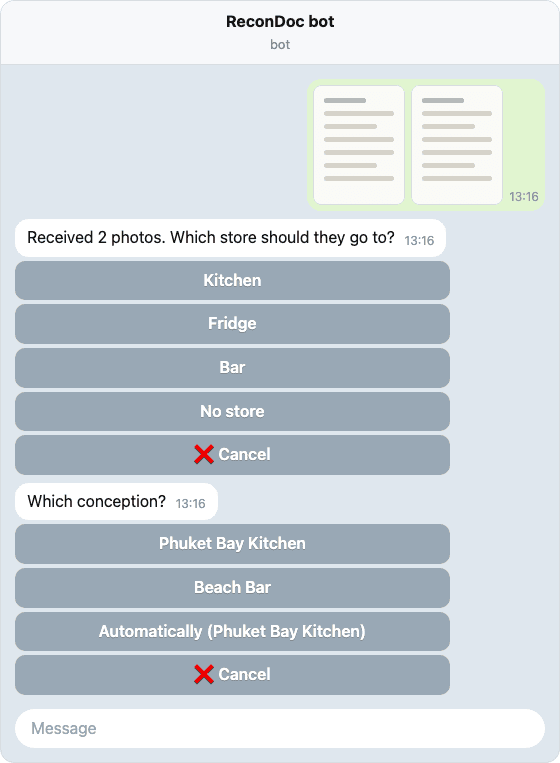
If iiko has several conceptions, the bot can ask "Which conception?" after the store. The restaurant administrator turns it on: Settings → Bots & messengers, the Conception for bot uploads card. Modes: Don't ask (default), Ask if the store has no conception, Always ask. One mode covers all the restaurant's bots.
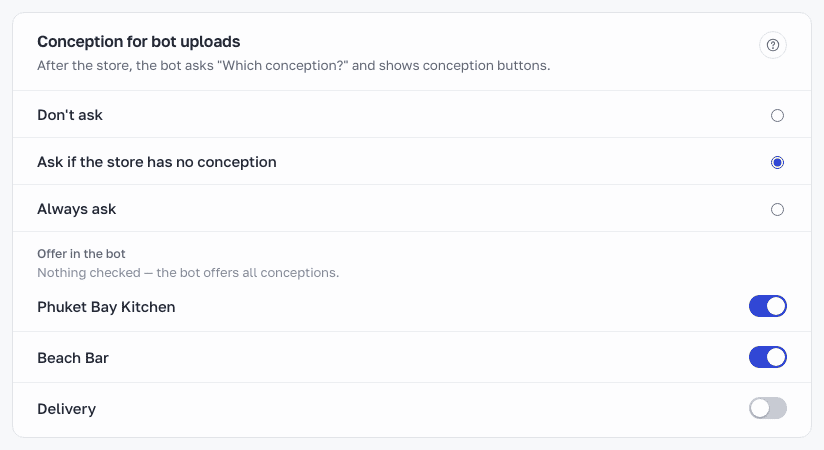
The same card is where you tick conceptions to Offer in the bot. Nothing ticked — the bot offers all of them. If only one fits, the bot sets it on its own. The Automatically button leaves the choice to the store and restaurant settings. The chosen conception is set on the invoice right away, and you can change it on the website. In a group chat the bot never asks for a conception. More in iiko conceptions.
Notifications#
To get mentions from the Questions section, link your Telegram in the messenger settings and press Start on the bot. Telegram doesn't let bots message a person first — without your Start, the message won't get through.
Support is a separate bot#
For questions about the service, write to @ReconDocSupportBot. That's a different bot: the link in settings is for invoices and doesn't cover support.
What about MAX?#
The bot works the same way in the MAX messenger: link with a code, then send photos either personally or from a group. Details are in The MAX bot.
Done. What's next?#
Next: security — exactly what the service does in your iiko.
What's next
Didn't find the answer, or the guide didn't help?
Ask support