Team: who to invite, and what they'll see
Administrator, operator and observer: permissions, the restaurant owner, invitations and warehouse access.
Where it is: Questions →
about 3 minUpdated October 8, 2026
The person working with invoices day to day is usually not the owner — it's whoever receives goods or keeps the books. That's what roles are for.
Roles#
| What they can do | What they can't do | |
|---|---|---|
| Restaurant administrator | Everything an operator can, plus the iiko connection and invoice rules, plan, billing and usage, team and invitations, ReconDoc support access. Sees every warehouse. Can promote an operator to administrator | Demote or remove the owner, transfer ownership, delete the restaurant |
| Operator | Upload, review and send invoices, reference data, mappings, questions, recipe cards and prices, supplier payments (when the section is enabled) | Change the iiko connection and invoice rules (read-only for them), plan, billing, team |
| Observer | View-only access to invoices and files, reference data, mappings, questions, recipe cards and prices | Any changes, sending to iiko/Syrve, settings |
| Payments manager | The supplier payments section (when enabled): view and mark payments; invoices are read-only | Change invoices or reference data, settings |
An operator sees exactly what's needed for daily work. The plan, billing and team aren't hidden behind a disabled button — they're simply not shown at all (Team members and Subscription & billing aren't even in the settings menu); the iiko connection and invoice rules are visible to an operator but read-only.
An observer is for someone who needs to follow the work without changing data. They can search, filter and open invoices and files, then view reference data, mappings, questions, recipe cards and prices. The app marks their access as “View only”: uploading, editing, deleting, sending to iiko/Syrve, syncing, posting question messages and receiving invoices through bots are unavailable.
Restaurant owner#
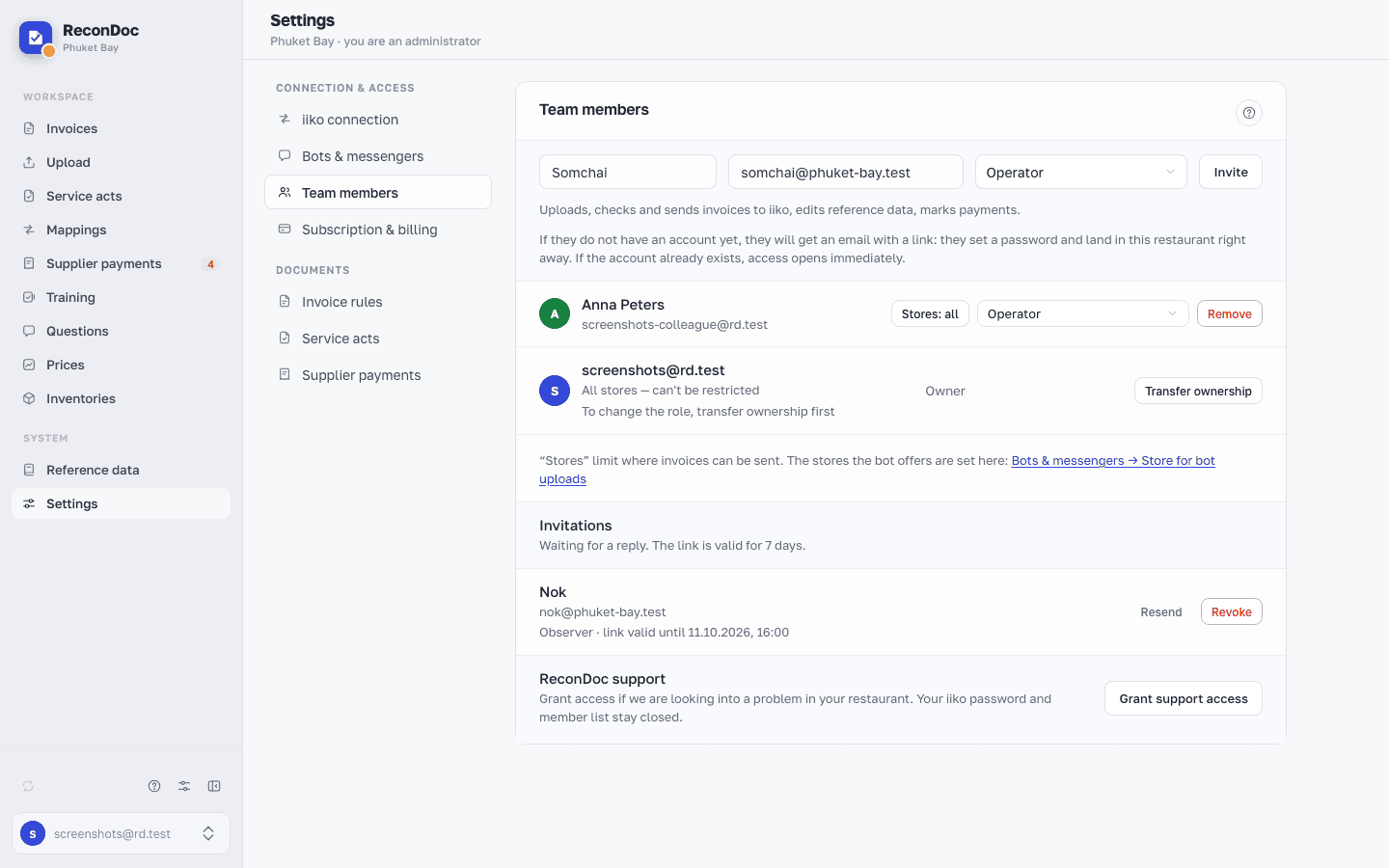
Each restaurant has exactly one owner, who is also an administrator. The owner can't be demoted or removed until they hand ownership over. The transfer is a button in Settings → Team members: another administrator becomes the owner, and the previous owner stays an administrator. Only the owner can delete the restaurant.
An administrator can limit an operator's or observer's access by warehouse. With no warehouse assignments, the person can see every warehouse in that restaurant.
There's also a separate special role: "ReconDoc support." It isn't invited — the administrator turns it on and off with a single button whenever we need to help, and support itself can't grant that access to itself or anyone else. What it sees and how to manage it is covered in ReconDoc support access.
How to invite someone#
Settings → Team members. Enter an email and click Invite — the service figures out what to do from there:
- If the person already has an account in the service — they show up in this restaurant's member list right away and get an email saying they now have access — no separate invitation needed.
- If they don't have an account yet — they get an email with a link: they set a password and land straight in this restaurant. The link itself is shown only once, right after you click Invite, and gets copied to your clipboard at that moment — that's your chance to send it yourself, say over Telegram.
- If the person is already a member of this restaurant — the service just says so; nothing new gets created.
Before inviting someone, pick a role in the list: under each role's name it says what the role can do. Choose Operator or Observer. You can't invite someone straight as an administrator: invite them as an operator and promote them. A restaurant administrator can later switch an existing member between roles, including promoting an operator to administrator.
Important
The link is valid for a week. Lost it, or didn't make it in time — click Resend in the invitations list: the old link dies immediately, and a popup shows the new one. An invite you don't need anymore can be Revoked.
Several restaurants#
One account can belong to several restaurants — you pick the right one at login. Roles are independent: you can be an administrator in one restaurant and an operator or observer in another.
Discussing an invoice#
If something on an invoice is unclear, you don't have to call. The invoice card's ⋮ menu has Ask colleagues: leave a note and mention a colleague — they'll get a Telegram notification if they've linked their bot.
An observer can read the discussion but cannot post a message or mention a colleague.
Tip
This beats a thread in a messaging app: the question stays attached to that specific invoice, and a month later it's still clear what it was about.
Done. What's next?#
Next: sending invoices straight from Telegram.
What's next
Didn't find the answer, or the guide didn't help?
Ask support