The supplier card
The supplier card: the status in iiko, links to the supplier's invoices and mappings, default VAT, tax in line amounts, payment terms, store.
about 3 minUpdated September 15, 2026
The supplier card opens from the Suppliers list. It holds the status in iiko / Syrve, quick links to this supplier's invoices and mappings, and the settings that apply to all of their new invoices: default VAT, tax in line amounts, payment terms, store.
The screen#
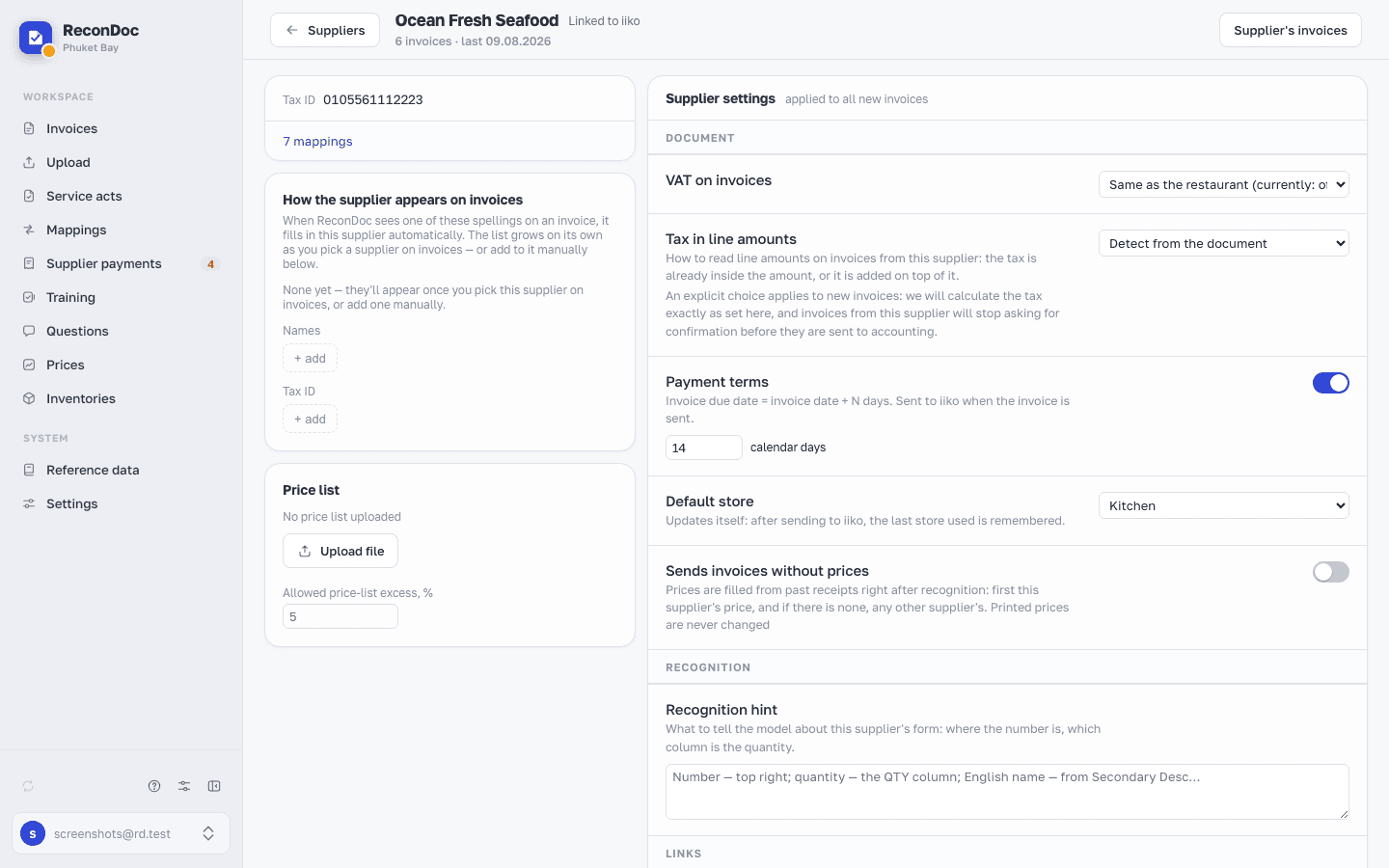 1234567
- Linked to iiko — the supplier was found in the iiko / Syrve reference data, and delivery invoices are created against them. There's also Local: iiko doesn't recognize this supplier, and in the Suppliers list you're offered the chance to merge them into the right one — otherwise some of the mappings and invoices settle on one card and some on the other.
- Supplier's invoices — takes you to the main invoice list, already filtered by this supplier.
- VAT on invoices — the default rate for this supplier's new invoices: Same as the restaurant takes the restaurant's current setting, or VAT can be turned on or off for this supplier alone.
- mappings — takes you to the Mappings section, already filtered by this supplier: all of their saved matches in one list.
- Tax in line amounts — how to read the line amounts on this supplier's invoices: the tax is already inside each line amount, or it's added on top of it. Detect from the document means we decide for ourselves on each invoice. An explicit choice applies to new invoices: the tax is calculated the way it says here, and this supplier's invoices stop asking for confirmation before they're sent to accounting.
- Payment terms — how many calendar days from the invoice date to the due date; with the toggle off, no due date is calculated at all.
- Default store — the store filled into this supplier's new invoices; after every send to iiko the last store used is remembered on its own.
Where an invoice's due date comes from#
The payment terms are set here once, and after that the due date on every invoice from this supplier is calculated on its own. There's more in Payment terms.
Done. Where next?#
The card fine-tunes what recognition and matching don't pick themselves: VAT, tax in line amounts, payment terms, the store. How the supplier is worked out on an invoice in the first place, and why that matters more than it looks, is in The invoice's supplier.
What you do here
What's next
Didn't find the answer, or the guide didn't help?
Ask support